/ README.md
README.md
1 # Social Tokens - Contract and Backend 2 A (nearly) full-stack solution for social tokens that can be used by communities for prizes. 3 4 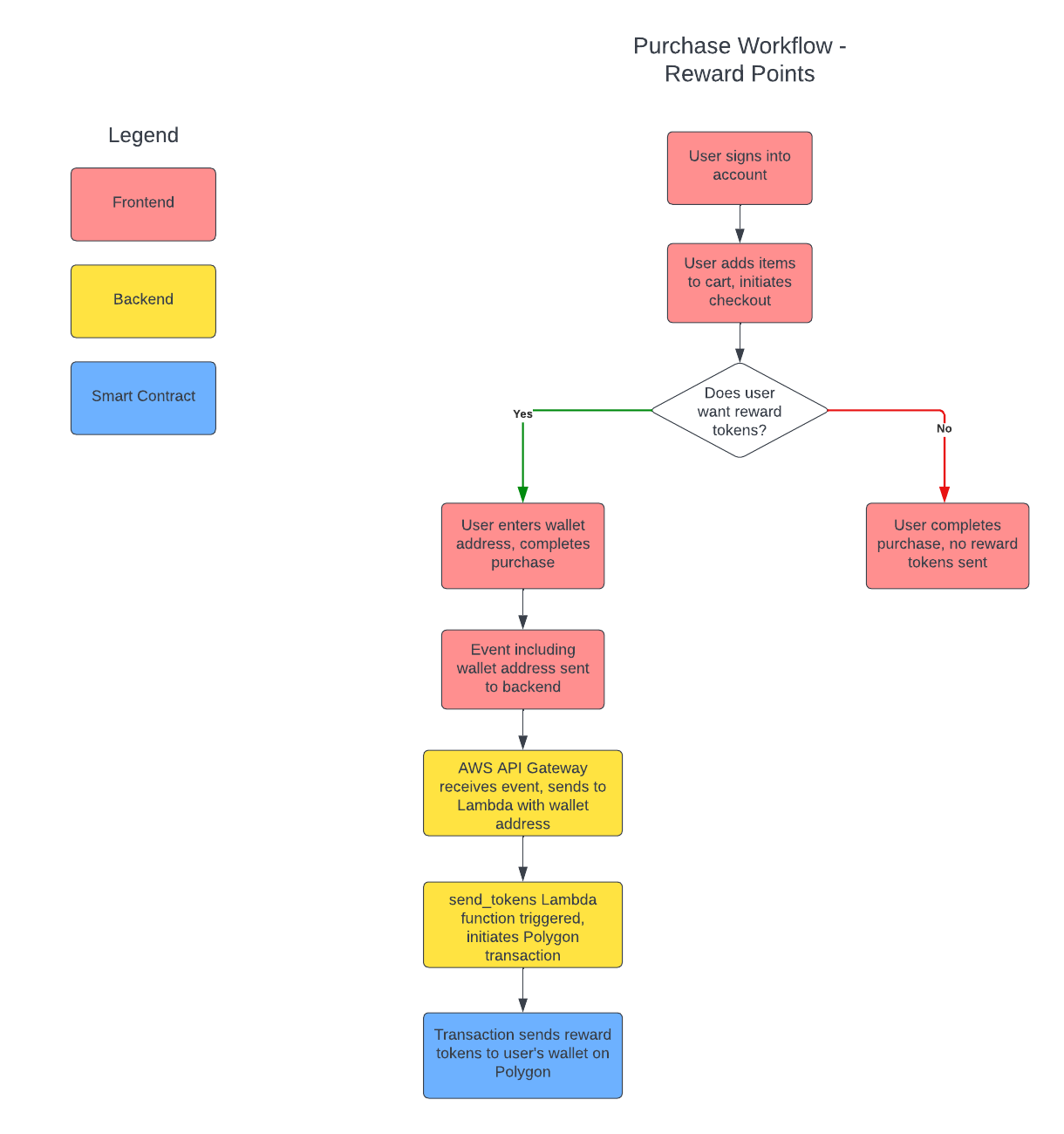 5 6 ## Contract 7 The contract is an implementation of EIP-4974, which describes social tokens. You can read more about the background on my [blog post](https://0xthresh.eth.limo/web3/contracts/socialtokens/2022/11/22/SocialTokens.html). 8 9 ### Contract Deployment 10 Contract can be deployed with the following steps: 11 1. Add a deployment account to brownie accounts with "brownie accounts add" 12 2. Define the network(s) in brownie you want to deploy to 13 3. Add a `.env` file and create an Infura ID, set as `WEB3_INFURA_PROJECT_ID` 14 - Optionally add a Polyscan token as `POLYGONSCAN_TOKEN` for instant verification 15 4. Use the deployment script by running: `brownie run token/scripts/deploy_social_token.py --network <network_name>` 16 - Suggest to deploy to an L2 like Polygon to save on gas 17 18 ## AWS Setup 19 An AWS Lambda function and API Gateway are used to receive events that kick off the transfer process. This is to enable the social tokens to be transferred through the smart contract automatically, without an operator having to manually send tokens to anyone participating in the ecosystem. This repo builds these resources with Terraform, which is an Infrastructure-as-Code (IaC) tool to automate building cloud resources. I will have more detailed instructions on how to use this code soon. 20 21 ## Frontend Setup 22 The API Gateway configured in the AWS Setup section assumes that a webhook will be used to trigger an event from a frontend that can kick off the backend social token transfer automatically when a certain event occurs. This repo does not make assumptions about what type of frontend should be used. The basic standards should be as follows: 23 1. The frontend is some type of storefront or social media site 24 2. The frontend has a method of opting users in - tokens should never be sent to users who have not consented to participation 25 26 ## Lambda Testing 27 Test setup on API - drop the below into the Body: 28 { 29 "walletAddress": "0x3a8eBfCcC377b09216586871be539aBFF9aB8ABf" 30 } 31 32 ## Deleting Secrets 33 When you `terraform apply` and `terraform destroy` AWS Secrets Manager secrets, they do not auto-delete. This is because AWS Secrets Manager has built-in protection for secrets to ensure that accidentally deleted secrets can be recovered for a specific time window (seven days by default). To permanently delete old secrets: 34 - aws secretsmanager delete-secret --secret-id infura_id --force-delete-without-recovery 35 - aws secretsmanager delete-secret --secret-id wallet_private_key --force-delete-without-recovery