README.md
1 # node-notifier [![NPM version][npm-image]][npm-url] [![Build Status][travis-image]][travis-url] 2 3 Send cross platform native notifications using Node.js. Notification Center for macOS, 4 `notify-osd`/`libnotify-bin` for Linux, Toasters for Windows 8/10, or taskbar balloons for 5 earlier Windows versions. Growl is used if none of these requirements are met. 6 [Works well with Electron](#within-electron-packaging). 7 8  9 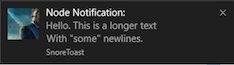 10 11 ## Input Example macOS Notification Center 12 13 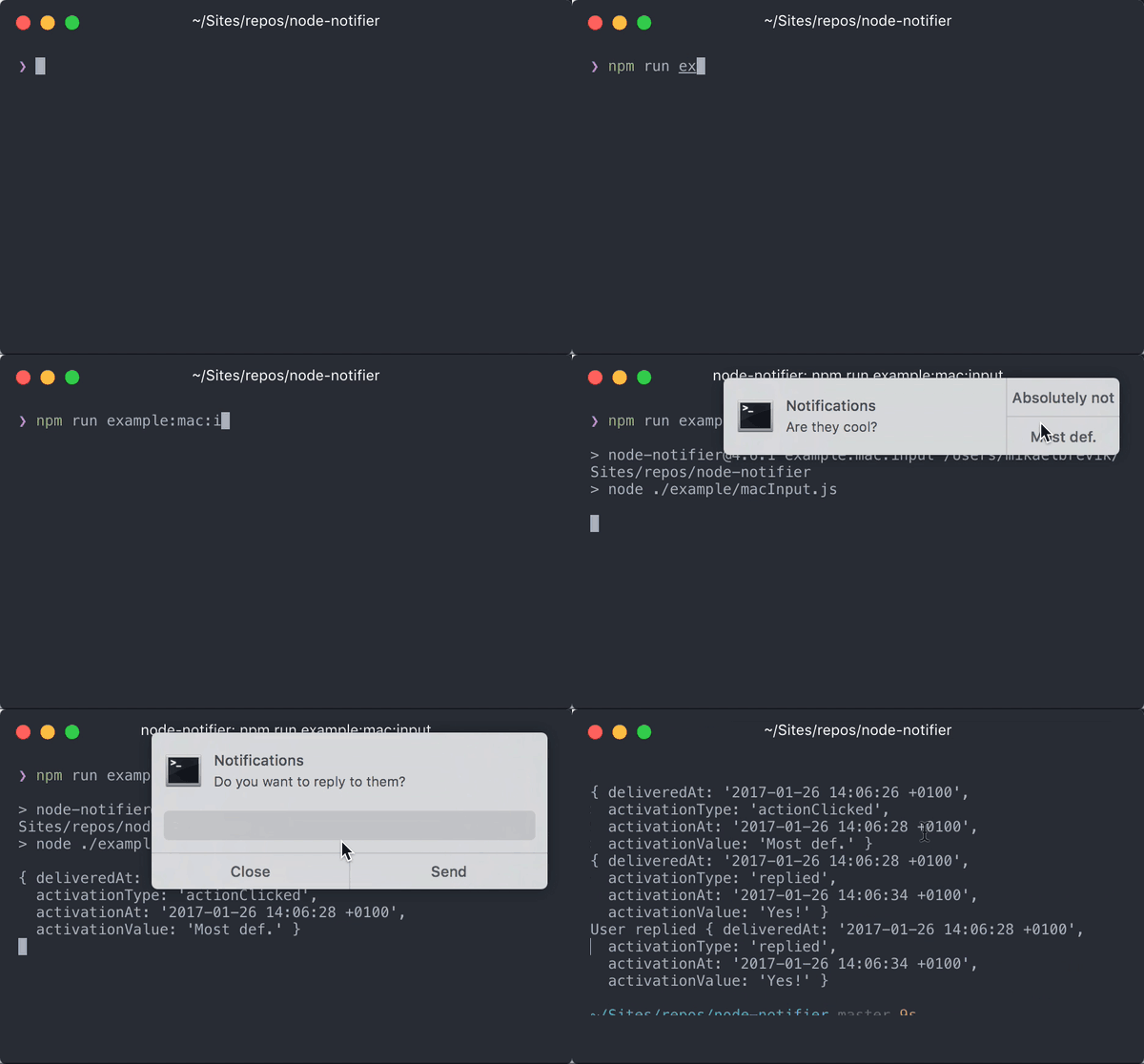 14 15 ## Actions Example Windows SnoreToast 16 17 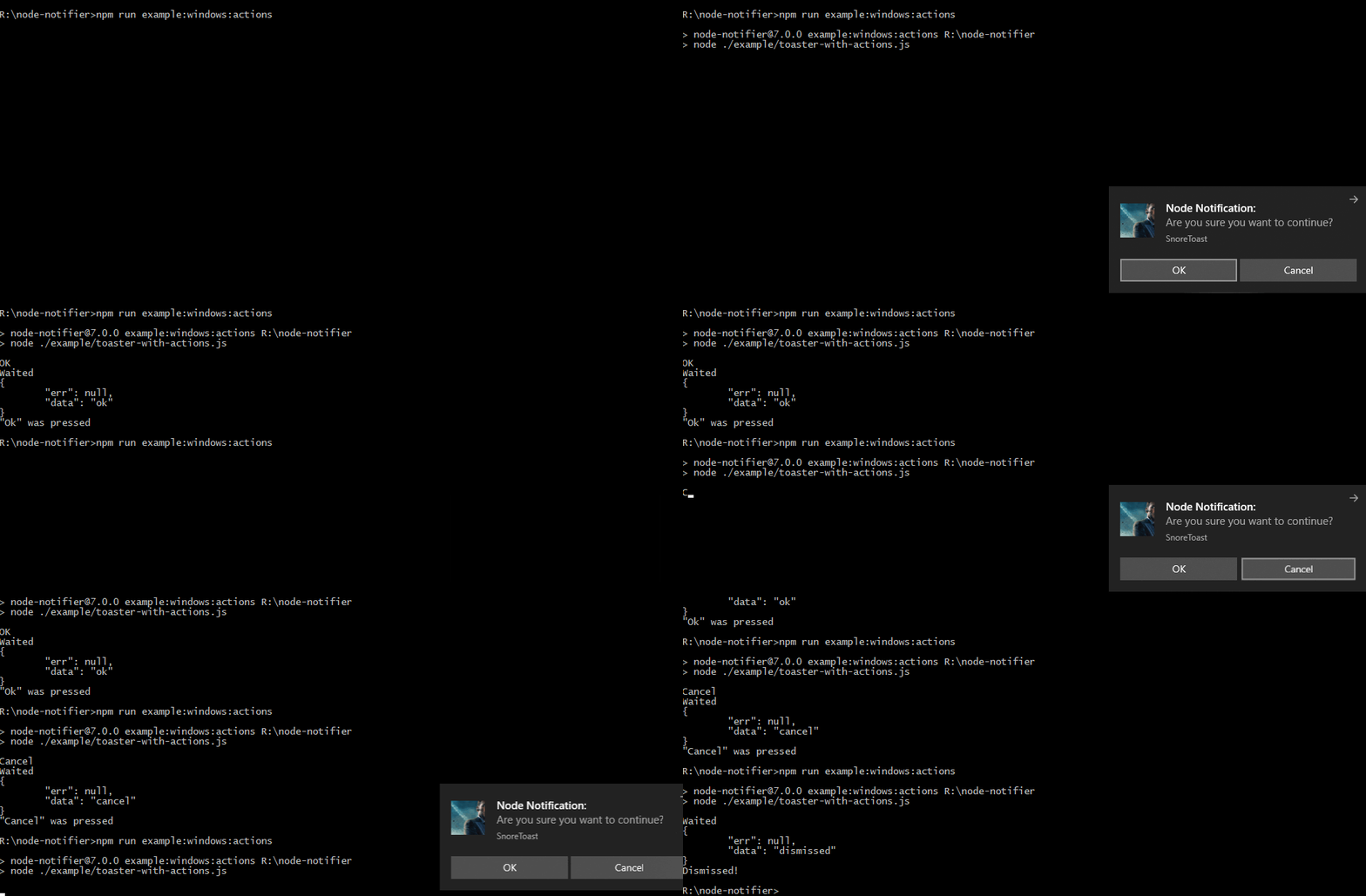 18 19 ## Quick Usage 20 21 Show a native notification on macOS, Windows, Linux: 22 23 ```javascript 24 const notifier = require('node-notifier'); 25 // String 26 notifier.notify('Message'); 27 28 // Object 29 notifier.notify({ 30 title: 'My notification', 31 message: 'Hello, there!' 32 }); 33 ``` 34 35 ## Requirements 36 37 - **macOS**: >= 10.8 for native notifications, or Growl if earlier. 38 - **Linux**: `notify-osd` or `libnotify-bin` installed (Ubuntu should have this by default) 39 - **Windows**: >= 8, or task bar balloons for Windows < 8. Growl as fallback. Growl takes precedence over Windows balloons. 40 - **General Fallback**: Growl 41 42 See [documentation and flow chart for reporter choice](./DECISION_FLOW.md). 43 44 ## Install 45 46 ```shell 47 npm install --save node-notifier 48 ``` 49 50 ## <abbr title="Command Line Interface">CLI</abbr> 51 52 <abbr title="Command Line Interface">CLI</abbr> has moved to separate project: 53 <https://github.com/mikaelbr/node-notifier-cli> 54 55 ## Cross-Platform Advanced Usage 56 57 Standard usage, with cross-platform fallbacks as defined in the 58 [reporter flow chart](./DECISION_FLOW.md). All of the options 59 below will work in some way or another on most platforms. 60 61 ```javascript 62 const notifier = require('node-notifier'); 63 const path = require('path'); 64 65 notifier.notify( 66 { 67 title: 'My awesome title', 68 message: 'Hello from node, Mr. User!', 69 icon: path.join(__dirname, 'coulson.jpg'), // Absolute path (doesn't work on balloons) 70 sound: true, // Only Notification Center or Windows Toasters 71 wait: true // Wait with callback, until user action is taken against notification, does not apply to Windows Toasters as they always wait or notify-send as it does not support the wait option 72 }, 73 function (err, response) { 74 // Response is response from notification 75 } 76 ); 77 78 notifier.on('click', function (notifierObject, options, event) { 79 // Triggers if `wait: true` and user clicks notification 80 }); 81 82 notifier.on('timeout', function (notifierObject, options) { 83 // Triggers if `wait: true` and notification closes 84 }); 85 ``` 86 87 If you want super fine-grained control, you can customize each reporter individually, 88 allowing you to tune specific options for different systems. 89 90 See below for documentation on each reporter. 91 92 **Example:** 93 94 ```javascript 95 const NotificationCenter = require('node-notifier/notifiers/notificationcenter'); 96 new NotificationCenter(options).notify(); 97 98 const NotifySend = require('node-notifier/notifiers/notifysend'); 99 new NotifySend(options).notify(); 100 101 const WindowsToaster = require('node-notifier/notifiers/toaster'); 102 new WindowsToaster(options).notify(); 103 104 const Growl = require('node-notifier/notifiers/growl'); 105 new Growl(options).notify(); 106 107 const WindowsBalloon = require('node-notifier/notifiers/balloon'); 108 new WindowsBalloon(options).notify(); 109 ``` 110 111 Or, if you are using several reporters (or you're lazy): 112 113 ```javascript 114 // NOTE: Technically, this takes longer to require 115 const nn = require('node-notifier'); 116 117 new nn.NotificationCenter(options).notify(); 118 new nn.NotifySend(options).notify(); 119 new nn.WindowsToaster(options).notify(options); 120 new nn.WindowsBalloon(options).notify(options); 121 new nn.Growl(options).notify(options); 122 ``` 123 124 ## Contents 125 126 - [Notification Center documentation](#usage-notificationcenter) 127 - [Windows Toaster documentation](#usage-windowstoaster) 128 - [Windows Balloon documentation](#usage-windowsballoon) 129 - [Growl documentation](#usage-growl) 130 - [Notify-send documentation](#usage-notifysend) 131 132 ### Usage: `NotificationCenter` 133 134 Same usage and parameter setup as [**`terminal-notifier`**](https://github.com/julienXX/terminal-notifier). 135 136 Native Notification Center requires macOS version 10.8 or higher. If you have 137 an earlier version, Growl will be the fallback. If Growl isn't installed, an 138 error will be returned in the callback. 139 140 #### Example 141 142 Because `node-notifier` wraps around [**`terminal-notifier`**](https://github.com/julienXX/terminal-notifier), 143 you can do anything `terminal-notifier` can, just by passing properties to the `notify` 144 method. 145 146 For example: 147 148 - if `terminal-notifier` says `-message`, you can do `{message: 'Foo'}` 149 - if `terminal-notifier` says `-list ALL`, you can do `{list: 'ALL'}`. 150 151 Notification is the primary focus of this module, so listing and activating do work, 152 but they aren't documented. 153 154 ### All notification options with their defaults: 155 156 ```javascript 157 const NotificationCenter = require('node-notifier').NotificationCenter; 158 159 var notifier = new NotificationCenter({ 160 withFallback: false, // Use Growl Fallback if <= 10.8 161 customPath: undefined // Relative/Absolute path to binary if you want to use your own fork of terminal-notifier 162 }); 163 164 notifier.notify( 165 { 166 title: undefined, 167 subtitle: undefined, 168 message: undefined, 169 sound: false, // Case Sensitive string for location of sound file, or use one of macOS' native sounds (see below) 170 icon: 'Terminal Icon', // Absolute Path to Triggering Icon 171 contentImage: undefined, // Absolute Path to Attached Image (Content Image) 172 open: undefined, // URL to open on Click 173 wait: false, // Wait for User Action against Notification or times out. Same as timeout = 5 seconds 174 175 // New in latest version. See `example/macInput.js` for usage 176 timeout: 5, // Takes precedence over wait if both are defined. 177 closeLabel: undefined, // String. Label for cancel button 178 actions: undefined, // String | Array<String>. Action label or list of labels in case of dropdown 179 dropdownLabel: undefined, // String. Label to be used if multiple actions 180 reply: false // Boolean. If notification should take input. Value passed as third argument in callback and event emitter. 181 }, 182 function (error, response, metadata) { 183 console.log(response, metadata); 184 } 185 ); 186 ``` 187 188 --- 189 190 **Note:** The `wait` option is shorthand for `timeout: 5`. This just sets a timeout 191 for 5 seconds. It does _not_ make the notification sticky! 192 193 As of Version 6.0 there is a default `timeout` set of `10` to ensure that the application closes properly. In order to remove the `timeout` and have an instantly closing notification (does not support actions), set `timeout` to `false`. If you are using `action` it is recommended to set `timeout` to a high value to ensure the user has time to respond. 194 195 _Exception:_ If `reply` is defined, it's recommended to set `timeout` to a either 196 high value, or to nothing at all. 197 198 --- 199 200 **For macOS notifications: `icon`, `contentImage`, and all forms of `reply`/`actions` require macOS 10.9.** 201 202 Sound can be one of these: `Basso`, `Blow`, `Bottle`, `Frog`, `Funk`, `Glass`, 203 `Hero`, `Morse`, `Ping`, `Pop`, `Purr`, `Sosumi`, `Submarine`, `Tink`. 204 205 If `sound` is simply `true`, `Bottle` is used. 206 207 --- 208 209 **See Also:** 210 211 - [Example: specific Notification Centers](./example/advanced.js) 212 - [Example: input](./example/macInput.js). 213 214 --- 215 216 **Custom Path clarification** 217 218 `customPath` takes a value of a relative or absolute path to the binary of your 219 fork/custom version of **`terminal-notifier`**. 220 221 **Example:** `./vendor/mac.noindex/terminal-notifier.app/Contents/MacOS/terminal-notifier` 222 223 **Spotlight clarification** 224 225 `terminal-notifier.app` resides in a `mac.noindex` folder to prevent Spotlight from indexing the app. 226 227 ### Usage: `WindowsToaster` 228 229 **Note:** There are some limitations for images in native Windows 8 notifications: 230 231 - The image must be a PNG image 232 - The image must be smaller than 1024×1024 px 233 - The image must be less than 200kb 234 - The image must be specified using an absolute path 235 236 These limitations are due to the Toast notification system. A good tip is to use 237 something like `path.join` or `path.delimiter` to keep your paths cross-platform. 238 239 From [mikaelbr/gulp-notify#90 (comment)](https://github.com/mikaelbr/gulp-notify/issues/90#issuecomment-129333034) 240 241 > You can make it work by going to System > Notifications & Actions. The 'toast' 242 > app needs to have Banners enabled. (You can activate banners by clicking on the 243 > 'toast' app and setting the 'Show notification banners' to On) 244 245 --- 246 247 **Windows 10 Fall Creators Update (Version 1709) Note:** 248 249 [**Snoretoast**](https://github.com/KDE/snoretoast) is used to get native Windows Toasts! 250 251 The default behaviour is to have the underlying toaster applicaton as `appID`. 252 This works as expected, but shows `SnoreToast` as text in the notification. 253 254 With the Fall Creators Update, Notifications on Windows 10 will only work as 255 expected if a valid `appID` is specified. Your `appID` must be exactly the same 256 value that was registered during the installation of your app. 257 258 You can find the ID of your App by searching the registry for the `appID` you 259 specified at installation of your app. For example: If you use the squirrel 260 framework, your `appID` will be something like `com.squirrel.your.app`. 261 262 ```javascript 263 const WindowsToaster = require('node-notifier').WindowsToaster; 264 265 var notifier = new WindowsToaster({ 266 withFallback: false, // Fallback to Growl or Balloons? 267 customPath: undefined // Relative/Absolute path if you want to use your fork of SnoreToast.exe 268 }); 269 270 notifier.notify( 271 { 272 title: undefined, // String. Required 273 message: undefined, // String. Required if remove is not defined 274 icon: undefined, // String. Absolute path to Icon 275 sound: false, // Bool | String (as defined by http://msdn.microsoft.com/en-us/library/windows/apps/hh761492.aspx) 276 id: undefined, // Number. ID to use for closing notification. 277 appID: undefined, // String. App.ID and app Name. Defaults to no value, causing SnoreToast text to be visible. 278 remove: undefined, // Number. Refer to previously created notification to close. 279 install: undefined // String (path, application, app id). Creates a shortcut <path> in the start menu which point to the executable <application>, appID used for the notifications. 280 }, 281 function (error, response) { 282 console.log(response); 283 } 284 ); 285 ``` 286 287 ### Usage: `Growl` 288 289 ```javascript 290 const Growl = require('node-notifier').Growl; 291 292 var notifier = new Growl({ 293 name: 'Growl Name Used', // Defaults as 'Node' 294 host: 'localhost', 295 port: 23053 296 }); 297 298 notifier.notify({ 299 title: 'Foo', 300 message: 'Hello World', 301 icon: fs.readFileSync(__dirname + '/coulson.jpg'), 302 wait: false, // Wait for User Action against Notification 303 304 // and other growl options like sticky etc. 305 sticky: false, 306 label: undefined, 307 priority: undefined 308 }); 309 ``` 310 311 See more information about using [growly](https://github.com/theabraham/growly/). 312 313 ### Usage: `WindowsBalloon` 314 315 For earlier versions of Windows, taskbar balloons are used (unless 316 fallback is activated and Growl is running). The balloons notifier uses a great 317 project called [**`notifu`**](http://www.paralint.com/projects/notifu/). 318 319 ```javascript 320 const WindowsBalloon = require('node-notifier').WindowsBalloon; 321 322 var notifier = new WindowsBalloon({ 323 withFallback: false, // Try Windows Toast and Growl first? 324 customPath: undefined // Relative/Absolute path if you want to use your fork of notifu 325 }); 326 327 notifier.notify( 328 { 329 title: undefined, 330 message: undefined, 331 sound: false, // true | false. 332 time: 5000, // How long to show balloon in ms 333 wait: false, // Wait for User Action against Notification 334 type: 'info' // The notification type : info | warn | error 335 }, 336 function (error, response) { 337 console.log(response); 338 } 339 ); 340 ``` 341 342 See full usage on the [project homepage: **`notifu`**](http://www.paralint.com/projects/notifu/). 343 344 ### Usage: `NotifySend` 345 346 **Note:** `notify-send` doesn't support the `wait` flag. 347 348 ```javascript 349 const NotifySend = require('node-notifier').NotifySend; 350 351 var notifier = new NotifySend(); 352 353 notifier.notify({ 354 title: 'Foo', 355 message: 'Hello World', 356 icon: __dirname + '/coulson.jpg', 357 358 wait: false, // Defaults no exipre time set. If true expire time of 5 seconds is used 359 timeout: 10, // Alias for expire-time, time etc. Time before notify-send expires. Defaults to 10 seconds. 360 361 // .. and other notify-send flags: 362 'app-name': 'node-notifier', 363 urgency: undefined, 364 category: undefined, 365 hint: undefined 366 }); 367 ``` 368 369 See flags and options on the man page [`notify-send(1)`](http://manpages.ubuntu.com/manpages/gutsy/man1/notify-send.1.html) 370 371 ## Thanks to OSS 372 373 `node-notifier` is made possible through Open Source Software. 374 A very special thanks to all the modules `node-notifier` uses. 375 376 - [`terminal-notifier`](https://github.com/julienXX/terminal-notifier) 377 - [`Snoretoast`](https://github.com/KDE/snoretoast) 378 - [`notifu`](http://www.paralint.com/projects/notifu/) 379 - [`growly`](https://github.com/theabraham/growly/) 380 381 [![NPM downloads][npm-downloads]][npm-url] 382 383 ## Common Issues 384 385 ### Windows: `SnoreToast` text 386 387 See note on "Windows 10 Fall Creators Update" in Windows section. 388 _**Short answer:** update your `appID`._ 389 390 ### Use inside tmux session 391 392 When using `node-notifier` within a tmux session, it can cause a hang in the system. 393 This can be solved by following the steps described in [this comment](https://github.com/julienXX/terminal-notifier/issues/115#issuecomment-104214742) 394 395 There’s even more info [here](https://github.com/mikaelbr/node-notifier/issues/61#issuecomment-163560801) 396 <https://github.com/mikaelbr/node-notifier/issues/61#issuecomment-163560801>. 397 398 ### macOS: Custom icon without Terminal icon 399 400 Even if you define an icon in the configuration object for `node-notifier`, you will 401 see a small Terminal icon in the notification (see the example at the top of this 402 document). 403 404 This is the way notifications on macOS work. They always show the icon of the 405 parent application initiating the notification. For `node-notifier`, `terminal-notifier` 406 is the initiator, and it has the Terminal icon defined as its icon. 407 408 To define your custom icon, you need to fork `terminal-notifier` and build your 409 custom version with your icon. 410 411 See [Issue #71 for more info](https://github.com/mikaelbr/node-notifier/issues/71) 412 <https://github.com/mikaelbr/node-notifier/issues/71>. 413 414 ### Within Electron Packaging 415 416 If packaging your Electron app as an `asar`, you will find `node-notifier` will fail to load. 417 418 Due to the way asar works, you cannot execute a binary from within an `asar`. 419 As a simple solution, when packaging the app into an asar please make sure you 420 `--unpack` the `vendor/` folder of `node-notifier`, so the module still has access to 421 the notification binaries. 422 423 You can do so with the following command: 424 425 ```bash 426 asar pack . app.asar --unpack "./node_modules/node-notifier/vendor/**" 427 ``` 428 429 ### Using with pkg 430 431 For issues using with the pkg module. Check this issue out: https://github.com/mikaelbr/node-notifier/issues/220#issuecomment-425963752 432 433 ### Using Webpack 434 435 When using `node-notifier` inside of `webpack`, you must add the snippet below to your `webpack.config.js`. 436 437 This is necessary because `node-notifier` loads the notifiers from a binary, so it 438 needs a relative file path. When webpack compiles the modules, it supresses file 439 directories, causing `node-notifier` to error on certain platforms. 440 441 To fix this, you can configure webpack to keep the relative file directories. 442 Do so by append the following code to your `webpack.config.js`: 443 444 ```javascript 445 node: { 446 __filename: true, 447 __dirname: true 448 } 449 ``` 450 451 ## License 452 453 This package is licensed using the [MIT License](http://en.wikipedia.org/wiki/MIT_License). 454 455 [SnoreToast](https://raw.githubusercontent.com/mikaelbr/node-notifier/master/vendor/snoreToast/LICENSE) and [Notifu](https://raw.githubusercontent.com/mikaelbr/node-notifier/master/vendor/notifu/LICENSE) have licenses in their vendored versions which do not match the MIT license, LGPL-3 and BSD 3-Clause to be specific. We are not lawyers, but have made our best efforts to conform to the terms in those licenses while releasing this package using the license we chose. 456 457 [npm-url]: https://npmjs.org/package/node-notifier 458 [npm-image]: http://img.shields.io/npm/v/node-notifier.svg?style=flat 459 [npm-downloads]: http://img.shields.io/npm/dm/node-notifier.svg?style=flat 460 [travis-url]: http://travis-ci.org/mikaelbr/node-notifier 461 [travis-image]: http://img.shields.io/travis/mikaelbr/node-notifier.svg?style=flat