<!doctype html>
<html lang="en">
  <head>
    <meta charset="utf-8">
    <meta name="viewport" content="width=device-width, initial-scale=1">
    <title>Cradicle Explorer</title>
    <link href="/css/bootstrap/bootstrap.min.css" rel="stylesheet">
    <style>
      .form-control-dark::placeholder {
          color: #aaa;
          opacity: 1;
      }
    </style>
    <link rel="stylesheet" href="/assets/fontawesome/css/all.min.css">
    <link rel="icon" type="image/png" href="/favicon.png">


                <link href="/css/dashboard.css" rel="stylesheet">
                </head>
                <body>
                <header class="navbar navbar-dark sticky-top bg-dark flex-md-nowrap p-0 shadow">
                  <a class="navbar-brand col-md-3 col-lg-2 me-0 px-3 fs-6" href="/">Cradicle Explorer</a>
                  <button class="navbar-toggler position-absolute d-md-none collapsed" type="button" data-bs-toggle="collapse" data-bs-target="#sidebarMenu" aria-controls="sidebarMenu" aria-expanded="false" aria-label="Toggle navigation">
                    <span class="navbar-toggler-icon"></span>
                  </button>
                  <form method="get" action="/cgi-bin/main" style="width:100%;"><input class="form-control form-control-dark w-100 rounded-0 border-0" type="text" name="q" placeholder="Search repos" aria-label="Search"></form>
                  <div class="navbar-nav flex-row">
                    <div class="nav-item text-nowrap">
                      <a class="nav-link px-3 active" href="/cgi-bin/repo?id=z32MuWrmG2osjEjr2RP7TxZR1kkXA">events-processor</a>
                    </div>
                  </div>
                </header>
                <div class="container-fluid">
                  <div class="row">
                    <nav id="sidebarMenu" class="col-md-3 col-lg-2 d-md-block bg-dark sidebar collapse">
                      <div class="position-sticky pt-3 sidebar-sticky">
                        <ul class="nav flex-column">
                          <li class="nav-item">
                            <a class="nav-link active" href="/cgi-bin/repo?id=z32MuWrmG2osjEjr2RP7TxZR1kkXA">
                              <i class="align-text-bottom fa-solid fa-info"></i>
                              Info
                            </a>
                          </li>
                          <li class="nav-item">
                            <a class="nav-link" href="/cgi-bin/repo?id=z32MuWrmG2osjEjr2RP7TxZR1kkXA&issue=list">
                              <i class="align-text-bottom fa-solid fa-layer-group"></i>
                              Issues
                            </a>
                          </li>
                          <li class="nav-item">
                            <a class="nav-link" href="/cgi-bin/repo?id=z32MuWrmG2osjEjr2RP7TxZR1kkXA&patch=list">
                              <i class="align-text-bottom fa-solid fa-vest-patches"></i>
                              Patches
                            </a>
                          </li>
                          <li class="nav-item">
                            <a class="nav-link" href="/cgi-bin/repo?id=z32MuWrmG2osjEjr2RP7TxZR1kkXA&wallet=list">
                              <i class="align-text-bottom fa-solid fa-wallet"></i>
                              Wallets
                            </a>
                          </li>
                          <li class="nav-item">
                            <a class="nav-link" href="/cgi-bin/repo?id=z32MuWrmG2osjEjr2RP7TxZR1kkXA&source=.">
                              <i class="align-text-bottom fa-solid fa-code"></i>
                              Source
                            </a>
                          </li>
                        <h6 class="sidebar-heading d-flex justify-content-between align-items-center px-3 mt-4 mb-1 text-muted text-uppercase">
                          <span></span>
                        </h6>
                        <ul class="nav flex-column mb-2">
                        
                        </ul>
                      </div>
                    </nav>
                <main class="col-md-9 ms-sm-auto col-lg-10">
                  <div class="container px-1 py-3">
        

    <div class="list-group">
    <div class="list-group-item">
    <div style="font-size:1.3rem;">events-processor</div>
    <div class="repo-item">Optimization experiments (Community Computer)</div>
    <div>rad:z32MuWrmG2osjEjr2RP7TxZR1kkXA</div>
    </div>
    <div class="list-group-item">
    <div>Visibility</div>
    <div class="repo-item">public</div>
    </div>
    <div class="list-group-item">
    <div>Delegates</div><div class="repo-item">did:key:z6MkupQHdQky5atyAu9zF8dUu1EavUjckDgCdZLH8y2W8teE</div>
    </div>
    <div class="list-group-item">
    <div>Default branch</div>
    <div><span class="repo-item">main &#8594 2c12927cb29c2d2a493683790e4d7844a2de1a23</span> (Wed Oct 22 13:55:21 2025)</div>
    </div>
    <div class="list-group-item">
    <div>Threshold</div>
    <div class="repo-item">1</div>
    </div>
    </div>
    
        <div class="list-group mt-3">
        <div class="list-group-item">
        <div class="mb-2" style="font-weight:bold;"><i class="fa-solid fa-book"></i> README.md</div>
        <pre style="margin:0; font-size:0.85rem; overflow-x:auto; color:#fafafa;"># Drips Event Processor

:warning: **Warning**: This project is currently under active development.

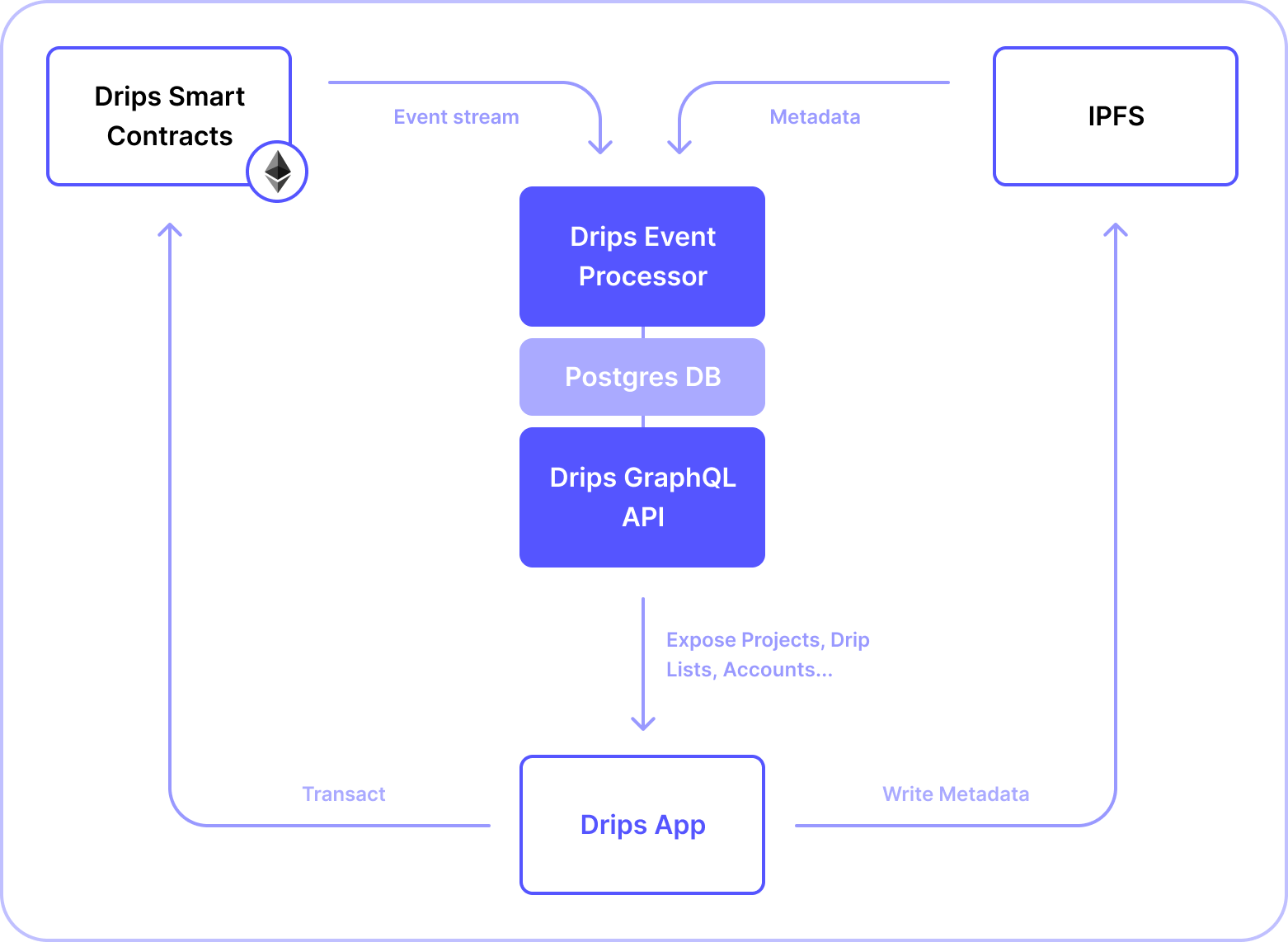
Drips Event Processor is a custom, read-only backend service for [Drips](https://drips.network). It ingests low-level Drips protocol Ethereum events and related IPFS documents in real-time, and produces a database of higher-level entities for the Drips App (such as &quot;Drip Lists&quot; and &quot;Projects&quot;). This database is then read by the [Drips GraphQL API](https://github.com/drips-network/graphql-api) in order to provide a single, convenient and fast endpoint for querying decentralized data within the Drips Network without complicated client-side logic.

As a &quot;read-only&quot; service, Drips Event Processor and Drips GraphQL API together merely act as a query API layer for on-chain activity, meaning that Ethereum and IPFS remain the source of truth for all activity on Drips. In practice, this means that anyone is able to run an instance of this service and reach the exact same state as Drips&#x27; production instance once all past events have been ingested.

&lt;br /&gt;

![Overview Diagram of Drips architecture](https://raw.githubusercontent.com/drips-network/events-processor/main/docs/assets/drips-event-processor-diagram.png)

&lt;br /&gt;

Drips Event Processor &amp; GraphQL API together are comparable in functionality and scope to the [Drips Subgraph](https://github.com/drips-network/subgraph), but add the flexibility of computing and exposing higher-level abstracted entities (such as `Projects` and `Drip Lists`). The canonical state of these entities is derived from low-level generics within the [Drips Protocol](https://github.com/drips-network/contracts), in combination with metadata stored on IPFS.

## 🏃‍♂️ Running The Development Environment

Run:

```bash
docker-compose up
```

This will spin up:

1. **Postgres**: the database for the application.

2. **pgAdmin**: the GUI for managing the PostgreSQL database.

3. **Redis**: the database for storing (bee)queue jobs.

_To monitor`BeeQueue` navigate to `http://localhost:3000/arena` after launching the app._

Docker is configured to preserve the state of the database and Redis in-between runs. If you want to start fresh, you&#x27;ll need to delete the respective volumes with Docker.

## 🔌 Connecting to pgAdmin

After you have ensured that the Docker containers are up and running, to connect to pgAdmin:

1. Open your browser and go to &lt;http://localhost:5050/&gt;.
2. Check out the `docker-compose.yml` file for the `PGADMIN_DEFAULT_EMAIL` and `PGADMIN_DEFAULT_PASSWORD` values. Use these to log into pgAdmin.
3. Check out the `servers.json` file for the `Name` and `Password` values. Use the `Password` value to connect to the `Name` Postgres server, if prompted.

## 🚀 Launching The Application

First, populate `.env` according to `.env.template`.

To launch the application, run:

```bash
npm install
```

Then, ensure you run the development environment, assuming you don&#x27;t intend to connect to external Postgres and Redis instances.

Lastly, run

```bash
npm run start:local
```

to start the server.

This command:

1. Establishes a connection to `dripsdb`.
2. Synchronizes the state of the database.
3. Ingests events up to the current block into the database.
4. Registers event listeners for tracking incoming events.
5. Continues appending new data to the database.
</pre>
        </div>
        </div>

</div>
</main>
</div>
</div>


</body>
</html>